


Apple liquidation lots are popular because the products hold their appeal, but they also carry the most ways to go wrong. A device that looks perfect can still be locked to someone else’s account, tied to a carrier, or have a failing battery. A repeatable testing routine is what separates a smooth sale from a return. Here is the process.
Start with the lock and carrier checks
Before you spend time on cosmetics, find out whether the device is usable by the next owner. Two checks matter most.
- Activation lock: a device linked to a previous owner’s Apple account cannot be set up by a new user without that account’s credentials. Check whether the device reaches the setup screen or asks for someone else’s account.
- Carrier or network status: some devices are tied to a particular carrier or have restrictions. Check the settings and any carrier information in the About screen, and use the manufacturer’s or carrier’s lookup tools when you need more detail.
Never assume. A device that is locked is a different product from one that is clean, and you must describe it that way. If you find a locked unit, set it aside, do not sell it as working, and check the lot’s terms. Our returns policy allows returns within 14 days, so report problems in that window.
When you buy, look for lots that describe their lock and carrier status, and ask for the manifest or category breakdown to see what is included. You can browse the iPhone Wholesale Lots category and compare how each lot is described.
Build a testing station
A good bench makes testing quick. You do not need much.
- A set of known-good charging cables and adapters.
- A clean, well-lit table with a soft mat.
- A small toolkit, a microfiber cloth, and cotton swabs.
- A notebook or spreadsheet with a row per device.
- A second device to pair with, for watch and earbud testing.
Label each unit with a number, record its serial number in your sheet, and keep a pass or fail column for every test. Do the same steps in the same order every time, because that is what prevents skipped checks.
Test every function, step by step
Run through a standard list. For iPhones, this takes a few minutes per unit once you have a rhythm.
- Power on, and confirm it boots without a loop or error.
- Check the screen for dead pixels, burn-in, lines, and touch response across all corners.
- Test both cameras, the flash, and the microphone and speakers.
- Check the charging port, and charge for a while to confirm it takes a charge.
- Test buttons, switches, and haptics.
- Check wireless connections and the SIM tray.
- Look at battery health in the settings, and note it.
- Restore or erase the device to its factory state if that is part of your routine, and check that it goes through setup.
For Apple Watch, check the screen, crown, side button, sensors, and pairing. Confirm the band connector works. The Apple Watch Wholesale Lots category lists what is on offer.
For AirPods, test the left and right earbuds, the case, and charging. Check that each bud connects, plays sound, and holds a charge. Look for sound problems, crackling, or uneven volume. Earbuds are personal items, so clean them carefully with a dry swab and a soft cloth, and describe their condition honestly. The AirPods Wholesale Lots page shows current options.
Grade honestly and consistently
Grading is where reputations are built. A buyer who receives a unit that matches your description will come back, and one who finds a hidden scratch or a weak battery will not. When two grades seem equally fair, choose the lower one.
Create a written grade scale and use it every time. A simple scale might read like this.
- Grade A: works fully, light or no visible wear.
- Grade B: works fully, noticeable scratches or marks.
- Grade C: works, with heavy wear, cracks in non-critical places, or reduced battery health.
- Parts or repair: faults, locks, or damage that stop normal use.
Write down what each grade means, because buyers will compare. Photograph every device from the front, back, and corners, and show the screen powered on. Put the battery health in the listing when you can, and describe cosmetic wear with specifics, not general words.
Lots are graded at lot level, so within a lot you will see a spread. Your own grading is what makes each unit sellable to the right buyer.
Accessories and packaging
Think about the unboxing, even for a used device. Wipe the screen, polish the back, and put the unit in a clean bag before it goes in the shipping carton. Small touches tell the buyer the item was handled by someone careful.
A clean cable and a basic adapter lift a listing. Match accessories to the device, and do not claim that anything is included unless it is in the bag. Use clear zip bags for each unit’s cables. A plain box with protective wrap looks cleaner than a tangle of loose cords.
Check that any included case fits and is not cracked. Test chargers before you pack them. Remove stickers and labels cleanly. For watches, check that the band is in good shape, and sell spare bands separately if you have them.
Where each grade sells
- Grade A: online marketplaces with buyer protection, and direct sales to buyers who want clean, ready devices.
- Grade B: marketplaces and local sales, where buyers accept some wear.
- Grade C: budget-minded buyers, local sales, or bulk sales to other resellers.
- Parts or repair: repair shops, hobbyists, and parts buyers.
Be clear about restrictions or battery wear in every listing, so buyers know what they are getting. If you are unsure about any local rule on reselling used electronics, check with your state.
FAQ
Can I test activation lock without the previous owner’s account?
You can see whether the device asks for someone else’s account at setup. If it does, it is locked and should be sold as such, or set aside. Do not try to bypass it.
Do I need to erase every device?
Do it if the device still holds data, and follow the manufacturer’s steps. A clean reset also shows you whether setup completes.
Should I sell iPhones, watches and earbuds in one listing?
Usually not. Separate listings help buyers find the exact item, though bundled accessories can go with the main device.
When you are ready to buy, check the shop all lots page, and send questions through our contact page.

Ready to stock up?
Shipping to your door is covered in every listed price, so checkout shows no separate freight charge. Curious what a pallet holds? Message us and we will send its latest manifest ahead of your order.
Cookies help this website work as it should. If you carry on browsing, you accept our cookie policy.
I AcceptYour Cart
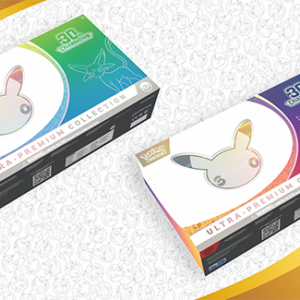
30 Sealed Pokemon Ultra-Premium Anniversary Collections, Daytime and Night
Price range: $1,250.00 USD through $3,750.00 USD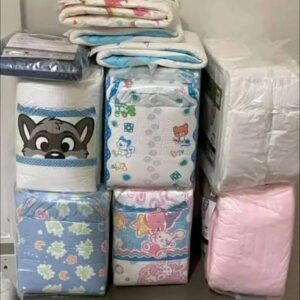
Adult Diaper Pallet: 300 Packs of Absorbent Products, Mixed Brands and Sizes
Price range: $350.00 USD through $1,000.00 USD
All Categories
Search
30 Sealed Pokemon Ultra-Premium Anniversary Collections, Daytime and Night
Price range: $1,250.00 USD through $3,750.00 USDAdult Diaper Pallet: 300 Packs of Absorbent Products, Mixed Brands and Sizes
Price range: $350.00 USD through $1,000.00 USD